
Why Does My Eye Color Look Different in Photos?
Same iris, different light: control the photo before you compare the color.
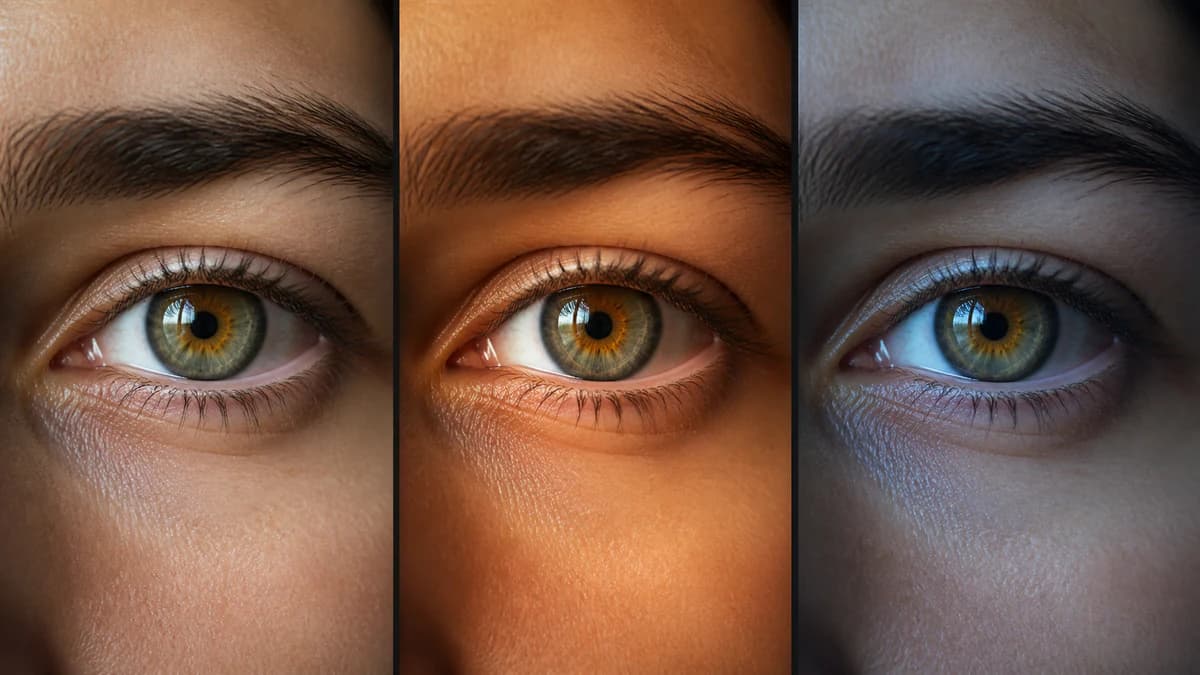
The short answer
A photograph does not record an abstract, permanent color label. It records the light reflected from your iris, then the camera interprets that signal. Change the light source, angle, exposure or white balance and the same iris can look warmer, cooler, lighter or darker.
For most adults, that variation is an appearance change rather than a pigment change. Mixed-color eyes make the effect especially obvious because different conditions emphasize different zones: gold near the pupil in one photo, green or gray farther out in another.
What the light changes
Light has a color, direction and intensity. Warm household bulbs contain a different balance of wavelengths from open shade or indirect daylight, so they do not illuminate every visible iris color equally. Direction matters too: a small hard source can produce glare, while broad indirect light reveals color and texture more evenly.
Pupil size also changes the picture. In dim light the pupil enlarges and less iris surface is visible; in brighter conditions it contracts and exposes more of the colored tissue. That can change the balance of inner and outer zones in the frame without changing either zone.
What the camera changes
Your phone processes the image before you see it. Automatic white balance tries to make the scene look neutral; automatic exposure lifts or lowers brightness; HDR combines tones; sharpening and noise reduction alter fine texture. Two camera apps can therefore produce different color from the same sensor and light.
- White balance shifts the whole image toward warmer yellow or cooler blue
- Exposure changes whether dark pigment separates into brown and amber or collapses into shadow
- HDR and local contrast can exaggerate the boundary between inner and outer color zones
- Front-camera smoothing, filters and social-app compression can remove fine iris detail
- Reflections from windows, screens and clothing can place borrowed color on the eye surface
A repeatable eye-photo setup
There is no universal camera setting that reveals a single absolute eye color, but a controlled setup gives you a dependable reference. Consistency matters more than maximum brightness.
- Face a large window in indirect daylight; stay out of direct sun
- Turn off nearby warm lamps and use a neutral wall or background
- Clean the rear camera lens, disable beauty filters and avoid direct flash
- Use macro mode only if it focuses cleanly; otherwise step back and crop
- Tap the iris to focus, lower exposure if highlights clip, and take three frames
- For a later comparison, reuse the same phone, position, room and time of day
Compare zones, not one average swatch
Look at the iris in regions: the area next to the pupil, the middle field and the outer edge. A hazel iris may contain a warm center and greener outer field; a blue-gray iris may have a yellow-brown inner ring. Averaging the whole crop into one color hides the arrangement that explains why the eye changes character between photos.
Reject frames with blown white reflections, deep shadow across half the iris, motion blur or a filter. If two good frames still differ, keep both: they show the range of appearance under those conditions, not two competing identities.
When a photo is not the right test
A color difference that appears only between photos is usually a capture issue. A new or persistent change you can see in person—especially in one eye, or with pain, redness, light sensitivity or a vision change—belongs with an optometrist or ophthalmologist. A color analyzer can describe pixels and visible zones; it cannot diagnose an eye condition.
Stop guessing — measure it
Photo-based color percentages, rarity score, and a shareable Iris Card in 60 seconds. Private: your photo never leaves your device.
Analyze My Eye Color FreeFrequently asked questions
Which photo shows my real eye color?
Use the sharp, unfiltered image made in indirect daylight with a neutral background as your reference. No photo is an absolute color measurement, but a controlled image is much more comparable than a selfie under mixed indoor light.
Why do my eyes look green in some photos and brown in others?
Mixed-color eyes contain several visible zones. Cool, broad light may emphasize green, while warm light and lower exposure emphasize gold and brown. White balance can push the result farther in either direction.
Should I use flash for an eye-color photo?
Avoid direct phone flash. It creates a bright reflection, flattens local color and can make the pupil response uncomfortable. Broad indirect daylight or a soft continuous light is easier to control.
Why do the front and rear cameras show different eye colors?
They use different sensors, lenses and processing. Front cameras also tend to apply stronger smoothing and work with lower detail. For comparison, use the same rear camera and app every time.
Can an eye-color analyzer correct bad lighting?
It can measure the pixels it receives, but it cannot reconstruct color hidden by glare, clipping, a heavy filter or mixed lighting. A clean, evenly lit source image is still the biggest accuracy improvement you can make.